§Patent Illustration & Visuals
Design patent drawings where every view counts
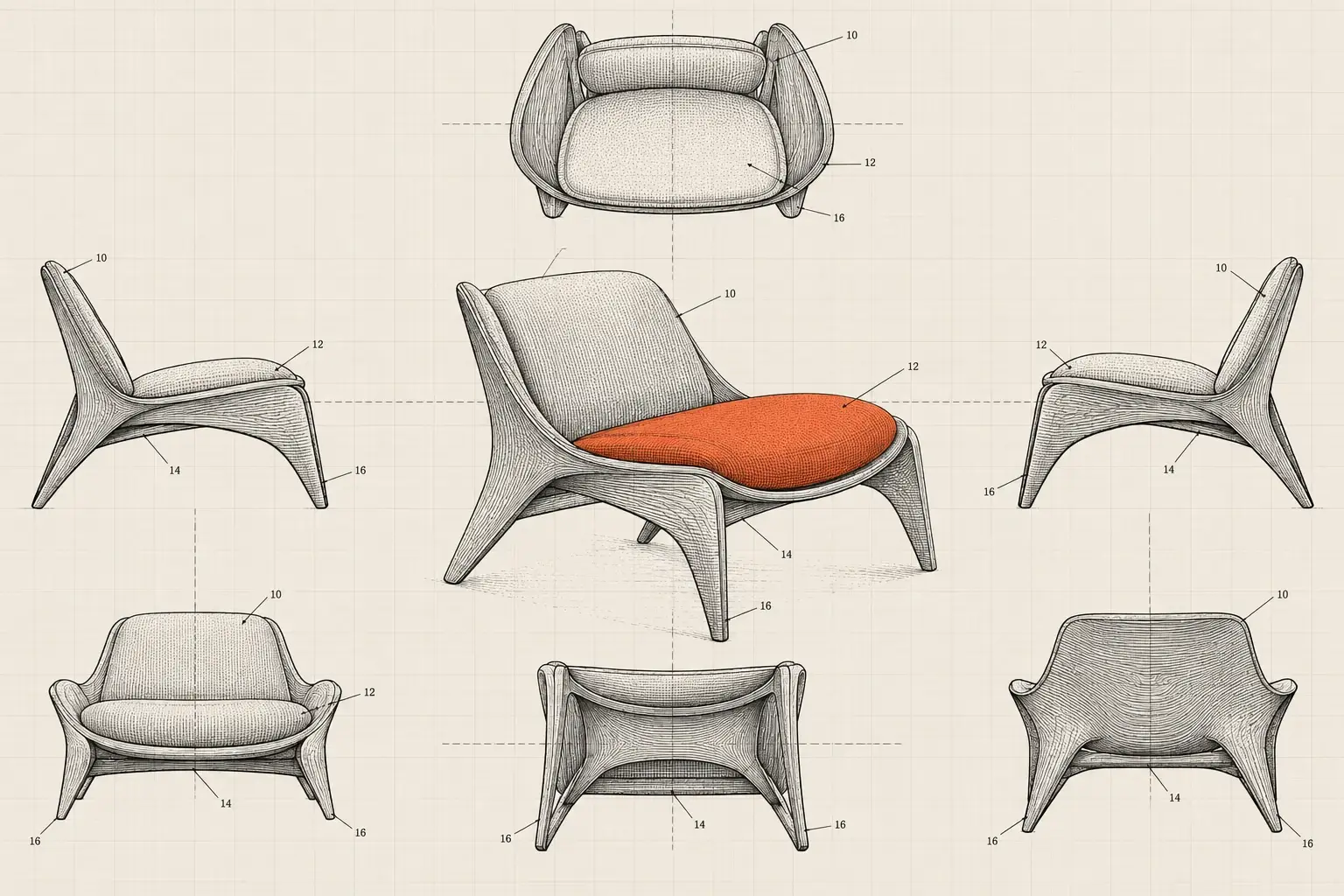
Shaded design views prepared from your product, CAD files, or screens, including GUIs, icons, and projected or AR/VR interfaces. First proofs in 4–6 business days, with two revision rounds included.
- Typical turnaround
- First proofs in 4–6 business days
- Best for
- Product designers, UX teams, and practitioners preparing design applications
- You receive
- A full set of shaded views as USPTO-format PDF, plus source files on request
- Revisions
- Two rounds included
- Delivered to
- You, or your patent attorney or agent
§ 01Deliverables
What you receive
Every side of the design, drawn the same way, so the views agree with each other.
The standard set of views
Front, rear, left, right, top, and bottom views, plus perspective views where they help, so the appearance is disclosed from every side.
Surface shading
Line shading that shows contour and character: curves read as curves, flat planes as flat, and transparent parts as transparent.
Broken lines, exactly as instructed
Unclaimed environment and boundaries drawn in broken lines, following the solid and broken-line treatment you or your practitioner choose.
GUI and icon sheets
Screens, icons, and interface states drawn as clean, consistent views for computer-generated designs.
Projected and AR/VR imagery
Interfaces shown in space, on surfaces, or within a headset view, drawn to reflect the USPTO's 2026 supplemental guidance on computer-generated interfaces and icons.
Formal sheets and source files
USPTO-format PDF sheets, plus source files on request.
§ 02Overview
When teams use it
New consumer products
A design patent protects appearance, so the drawings do most of the defining. Get them right before filing.
Apps and interfaces
GUI and icon designs need clean, consistent screen views. We draw them from your screenshots or design files.
AR, VR, and projected interfaces
Newly addressed by the USPTO in 2026. We draw them so the interface reads clearly, with or without a device in the picture.
Practitioners with design filings
Send your instructions on views and broken lines, and we produce the sheets. See how we support practitioners.
§ 03Process
How it works
- 01
Send the design
CAD files, photos of a prototype, screenshots, or sketches, plus your practitioner's instructions if you have them. NDA first, then a fixed-fee written quote within one business day of a free scoping call.
- 02
Agree on the view plan
We list the views and the solid and broken-line treatment you or your practitioner have chosen, and confirm before drawing.
- 03
First proofs
First proofs in 4–6 business days for a typical set. Rush timing is available when scope allows, quoted separately.
- 04
Two revision rounds
Mark up the proofs, or have your practitioner do it. Two revision rounds are included.
- 05
Final files
USPTO-format PDF, plus source files on request, delivered to you or your practitioner.
§ 04Context
Solid lines, broken lines, and why they matter
Design patent drawings carry more weight than utility drawings, because a design patent protects appearance and the drawings are the main way that appearance is defined. A design is seen from every side, and the views are the claim. That is why the USPTO's design patent guide asks for enough views to disclose the design completely, typically front, rear, both sides, top, and bottom.
Two conventions do most of the work. In plain English:
- Solid lines and shading show what is claimed. Under the drawing rule for designs, 37 CFR 1.152, surface shading shows the character and contour of surfaces, and solid black shading is reserved for the color black or color contrast.
- Broken lines show what is not claimed. They may show surrounding environment, such as the device around an icon, or mark a boundary, and the application then states that the broken lines form no part of the claimed design. Broken lines may not be used to show hidden surfaces that could not be seen through opaque material.
Which parts go in solid lines and which in broken lines is a claiming decision, so it belongs to you and your practitioner. Our job is to draw that decision precisely, and identically in every view.
§ 05 — Boundaries
What this is not
- Not a decision about claim scope. What is solid and what is broken is for you and your practitioner to decide.
- Not filing or prosecution. We deliver sheets to you or your practitioner; we don't submit anything to the USPTO.
- Not a design search. To see what already exists, start with a Design & Interface Patent Search.
- Not legal advice on whether a design qualifies for protection.
Metadragons LLC is not a law firm. We support registered practitioners with production.
§ 06Questions
Questions buyers ask
Something else on your mind? Call (505) 357-5188 or write to info@metadragons.com.
What should I send?
CAD files or photos showing every side of the product, or screenshots of each screen and state for interfaces. If your practitioner has instructions on views or broken lines, include them.
How long does it take?
First proofs in 4–6 business days for a typical set. Rush timing is available when scope allows and is quoted separately.
Can you draw interfaces for AR/VR headsets, projections, or holograms?
Yes. The USPTO's supplemental guidance of March 13, 2026 addresses computer-generated interfaces and icons, including projections, holograms, and virtual and augmented reality designs. Under it, the display panel becomes optional in the drawings when the title and claim identify the article. Your practitioner decides how to present the design; we draw it.
Can a drawing show only part of a product?
Design applications can use broken lines for surrounding parts that are not claimed, as described above. Whether to claim a part or the whole is a decision for you and your practitioner. We draw either one precisely.
Is my unreleased design kept confidential?
Yes. NDA before you share anything, US-based systems, encryption in transit and at rest, and no use of client materials to train AI models. On request, files are deleted within 30 days of project close. Our article on GUI, AR, and hologram drawings covers the newer formats in more depth.
Keep reading
Where to go next
§Next step
Put the design on paper, precisely
Send a general description first. After a free scoping call, you'll have a fixed-fee written quote within one business day.